Filosofo JavaScript Extract

What is Filosofo JavaScript Extract?
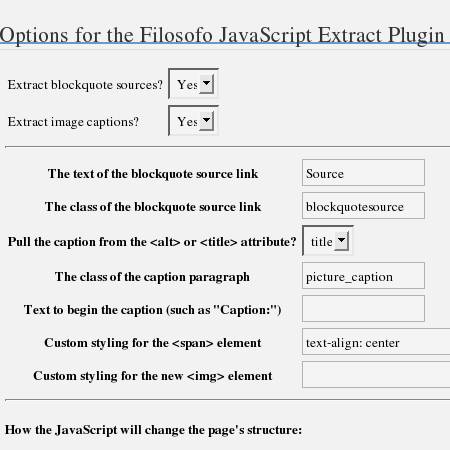
A screenshot of the admin options page

Filosofo Filosofo JavaScript Extract is a WordPress plugin that reveals blockquote sources by making a link from the cite attribute, and it turns image alt or title attributes into visible captions. It�s configurable from the admin control panel and simple to install.

Can I see it in action?

Yes–I’m using it here. Check out the screenshots: the captions have been extracted from the “title” attribute in the <img> element. And here’s a sample blockquote, with the source extracted into a link at the bottom:

This is the greatest plugin since sliced bread!

Note how the “floating” style of the images is maintained, even with the captions included. A screenshot of the admin options page
Will it work on my blog?

I’ve tested it successfully on WordPress blogs of version 1.5 or newer, including 2.0.

What are some of its features?

  • Configurable from the administrative control panel.
  • Simple install: just upload into the plugin folder and activate in your admin plugins page.
  • Extracts the cite attribute’s URL from the <blockquote> element.
  • Extracts captions from the <img> element’s “title” or “alt” attributes–you choose in the settings.
  • The plugin transfers the “class” and “id” attribute settings from the original “img” element to the “span” element now containing it, automatically.
  • Set class information and styling preferences from the admin control panel.
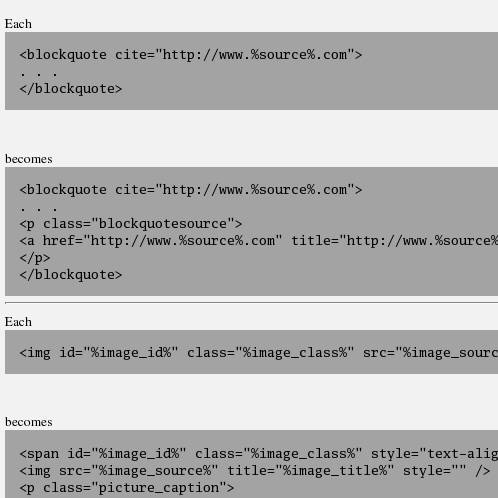
  • On the options page in the admin control panel, you can visualize how the JavaScript will change the document’s structure, so you can modify your styling (e.g. CSS class settings, etc.) accordingly, if you want.

Where do I download it?

Filosofo JavaScript Extract 0.6 | November 20, 2005

How do I install it?

Upload the


filosofo-javascript-extract.php
 
file into your plugins folder (in http://www.%your_blog_address%/wp-content/plugins/) and activate it in your control panel. That’s it!

I have suggestions or I need help. What can I do?

Please leave a comment below or send me an email at if.website (located at) gmail (dot) com .

See some of the other WordPress plugins I’ve created.
Like this plugin? Is it worth a latte?

My Amazon.com Wish List

This month I have received $27.00 for my plugin coding work, which is about $0.01 per download.

4 Trackbacks/Pingbacks

  1. [...] Il Filosofo has released a plugin that I’m not quite sure I understand all of its function. I believe what it does is provide a caption for images based on the title or alt tag, and a URL for a blockquote. Looks interesting, especially the caption feature. [...]

  2. [...] Filosofo Filosofo JavaScript Extract reveals blockquote sources by making a link from the cite attribute, and it turns image alt or title attributes into visible captions. [...]

  3. [...] Filosofo Filosofo JavaScript Extract reveals blockquote sources by making a link from the cite attribute, and it turns image alt or title attributes into visible captions. [...]

  4. [...] Plugin Page Author: surpi Time: Monday, December 3rd, 2007 at 8:18 am Category: WordPress Plugin Comments: You can leave a response, or trackback from your own site. RSS: You can follow any responses to this entry through the RSS 2.0 feed. Navigation: « Filosofo Highlight Current Category [...]

22 Comments

  1. tylerwillis commented on November 20, 2005 at 4:24 pm | Permalink
    tylerwillis

    I gave this plugin a try since it looks pretty useful, but it appears to break the alignment attribute. On some of my pages, I have 3 pics, two with left align, one with right. After turning on your plugin, the caption came through ok, but it shoved everything to the left, and it did not allow text to flow around.

    Is there a way to fix this?

  2. filosofo commented on November 20, 2005 at 6:18 pm | Permalink
    filosofo

    tylerwillis, could you be more specific? What was shoved to the left, the image, the caption, or the text?

    Also, if you mean by alignment that you have the CSS property of “text-align” set for your images, I’m puzzled that the text would be flowing around them anyways. Do you mean you have the “float” property set?

    Is there any way you can make a test page and leave a link?

  3. tylerwillis commented on November 20, 2005 at 8:58 pm | Permalink
    tylerwillis

    filosofo,
    I don’t set the alignment in the css for this particular usage, since these posts are made from HTML.

    Here’s a normal review post:
    http://www.tylerwillis.com/2005/09/11/fable/

    Here’s a post where I assigned the title attribute and used the plugin:
    http://www.tylerwillis.com/2005/10/14/fable-the-lost-chapters/

    Hope this helps.
    Thanks,
    Tyler

  4. tylerwillis commented on November 20, 2005 at 9:01 pm | Permalink
    tylerwillis

    Sorry, I meant to include this also… this is what the image call looks like in the normal example:

    Thanks,
    Tyler

  5. filosofo commented on November 20, 2005 at 9:57 pm | Permalink
    filosofo

    Tyler, the problem seems to be that your images use the “align” attribute, which by the way is deprecated for HTML 4.01.

    What the plugin does with JavaScript is to wrap the image with its caption in a <span>, giving the <span> whatever “class” attribute the image had. However, the image keeps the other attributes it already had. That means that your images have the “align” attribute but inside that <span>, so they don’t get aligned.

    I can’t make the plugin give all the possible attributes of images to <span>s, because there’d be all kinds of crazy results.

    However, if you were to change the ‘align="right"‘ to something like ‘class="rightside"‘, then in the CSS add this:
    .rightside { float: right; }
    you’d get the same effect, and it would be semantically-correct, too.

  6. tylerwillis commented on November 20, 2005 at 11:47 pm | Permalink
    tylerwillis

    Thanks for the response. I had not realized that align was deprecated; I went ahead and did a variation of what you suggested with the CSS, and it worked well.

    I also played around with the styling under the admin options - that’s a good touch. I moved the caption closer and bolded it.

    However, I do have a concern. I noticed that when the javascript is applied, it shrinks the picture. If your browser/connection is just slow enough, you can actually see it shrink after the pages loads and before the js is applied. (Check the fable-the-lost link that I provided above). Is this normal? Is there a way to stop it from happening?

    Thanks,
    Tyler

  7. filosofo commented on November 21, 2005 at 12:49 am | Permalink
    filosofo


    However, I do have a concern. I noticed that when the javascript is applied, it shrinks the picture. If your browser/connection is just slow enough, you can actually see it shrink after the pages loads and before the js is applied. (Check the fable-the-lost link that I provided above). Is this normal? Is there a way to stop it from happening?

    The problem was that you have set the the width attributes for the images to be larger than the image actually is, and that attribute wasn’t making it through to the newly created JavaScript img.

    I’ve updated the plugin to version .6 with a fix that should maintain any legitimate img attributes, such as “width” and “height,” hopefully eliminating problems such as this one.

  8. tylerwillis commented on November 21, 2005 at 12:59 am | Permalink
    tylerwillis

    Yeah, for those screenshots I use all sorts of random dimensions and rather than trying to scale everyone of those individually, I just set an approximate width and heigth.

    The new version works beautifully, thanks much for your work.

    If I see anything else, I’ll be sure to let ya know.
    Thanks,
    Tyler

  9. Aneesah commented on February 15, 2006 at 2:30 am | Permalink
    Aneesah

    I tried it out for the image captions and didn’t work quite right for me. I would prefer the span to be a div, and so I just ran a Replace on the script to change all the span to div. I don’t quite like the style tags, either — I’d like the div to have it’s own class and the image to have a different class.

    And somehow, the img tags ended with > instead of /> and the images didn’t appear at all in Firefox.

    I was really hoping this would work, because the script I use now doesn’t validate. :|

    Thanks anyway!

  10. filosofo commented on February 15, 2006 at 7:02 am | Permalink
    filosofo

    Aneesah,
    I’m curious what you mean by the img tags ending with >; the operation is done by JavaScript, so there shouldn’t be any change to the actual tags, just to the DOM.

    By the way, I used <span> tags to avoid validation problems, since block-level elements such as <div> shouldn’t appear in some places where images do so legitimately.

  11. Aneesah commented on February 16, 2006 at 10:42 am | Permalink
    Aneesah

    I figured out the img closing tag thing, my mistake. (I was viewing another source. ^^; ) I’ll try and make this plugin work for me, I’ll let you know how it goes.

  12. Aneesah commented on March 6, 2006 at 6:50 am | Permalink
    Aneesah

    Hi again, just wanted to let you know that I’ve made the plugin work on my site already, and you may ignore the e-mail I sent you earlier. ^^; Thanks very much!

  13. filosofo commented on July 21, 2006 at 10:30 pm | Permalink
    filosofo

    Hard to say why Firefox isn’t working on your site, without actually being able to see it in action.

  14. filosofo commented on July 22, 2006 at 3:23 pm | Permalink
    filosofo

    pirco, I got an email copy of your latest comment, even though it’s disappeared from my comments, for some unknown reason. (I think it might have accidentally gotten deleted with spam).

    At any rate, I think the problem has to do with this entry in your style sheet:

    p img {
    padding: 0;
    max-width: 100%;
    }

    Take out the max-width: 100%; and the pictures return.

    Besides, max-width: 100%; wouldn’t actually do anything useful, right?

  15. pirco commented on July 22, 2006 at 4:23 pm | Permalink
    pirco

    filosofo,
    (i think i accidentally hit “Post” twice and your blog assumed i’m spamming (can’t blame it).)

    i’m sure that the “p img {…}” style came with wordPress but i took out the max-width:100%; line and the pictures show.

    HOWEVER, now they don’t float:right or float:left, which my span.right and span.left styles should tell them to. looking at the source code (using “view selection source” in firefox for this page: http://www.thegeekbeat.com/entertainment/galactic-civilizations-ii-the-dread-lords/), i don’t see the span class=”right” or span class=”left” attribute. hmmm. i re-installed your plugin again and re-placed the images as well. here’s a source code snipped of the wordpress “write post” text editor (which shows the right-aligned image for the sample post):

    Galactic Civilizations III have to come clean …

    somehow, i guess the “align=right” attribute is not translated into span class=right, is it?

    i very much appreciate your help and your time!

    thanks,

    pirco

  16. pirco commented on July 22, 2006 at 9:59 pm | Permalink
    pirco

    hi filosofo,
    i think i made it work! i changed the code in your php file from
    span.className = images[i].className; to
    span.className = images[i].getAttribute(’align’);

    i’ll let you know if i run into other troubles. but thanks again for your time and especially for starting this plugin!

    =pirco

  17. filosofo commented on July 22, 2006 at 10:07 pm | Permalink
    filosofo

    I’m glad it’s working for you. Just so you know, the “align” attribute was deprecated by HTML 4.01 I think, and it’s not supported in XHTML, so you might get some strange results if you try to use it. Instead of align="right" try style="float:right;"

  18. pirco commented on July 22, 2006 at 10:15 pm | Permalink
    pirco

    hmm. well, i’m using wordpress 2.0.3 and the “write post” text editor automatically inserts the align="right" attribute. if it was using float:right; i could have used your plugin as is, i guess.
    my problem was that the plugin didn’t convert the left alignment of the image into float:left; but since the WP-generated HTML code had the align="right" attribute, i was able to take that and convert it into float:right; using your plugin and my added line.
    hope that makes sense and hopefully i wasn’t missing anything…
    thanks again.

  19. pirco commented on October 3, 2006 at 9:01 pm | Permalink
    pirco

    hi.
    not sure if i’m doing anything wrong but i noticed that windows IE doesn’t seem to break the lines. check out the longer captions on http://www.thegeekbeat.com

    thanks,
    pirco

  20. pirco commented on October 3, 2006 at 9:02 pm | Permalink
    pirco

    hi.
    not sure if i’m doing anything wrong but i noticed that windows IE doesn’t seem to break the lines. check out the longer captions on http://www.thegeekbeat.com

    thanks
    pirco

  21. filosofo commented on October 4, 2006 at 11:23 pm | Permalink
    filosofo

    pirco, the generated source DOM looks good–it’s just the way Internet Explorer incorrectly handles JavaScript.

    Since your pictures seem to be about 200px wide, you might try using CSS to limit p tags of class “caption” to width 200px and see if that does it.

  22. pirco commented on October 5, 2006 at 1:06 am | Permalink
    pirco

    OK!
    that was an easy solution that works for now.
    unfortunately, some images (within the articles) are full-width and those captions are now also 200px wide.
    but it’s the lesser of the two evils. so, thank you!
    i’ll take it from there.
    =pirco

See some of the other WordPress plugins I’ve created.
Like this plugin? Is it worth a latte?

My Amazon.com Wish List

This month I have received $27.00 for my plugin coding work, which is about $0.01 per download.

Post a Comment

Your email is never published nor shared. Required fields are marked *
*
*

Subscribe without commenting.